Il modello PIE (Dix and Runciman,1985)

Il modello PIE è un modello formale per i sistemi interattivi.
Script:=comandi degli utenti
P:=programmi (sequenza di comandi)
I:=funzione di interpretazione
E:=effetti ottenuti

Notazione

0 nessun comando
p sequenza di insieme di comandi
estenzione (non è un comando)

(Potrebbe essere confuso con il comando ENTER
es:c1-ENTER-c2-ENTER-c3... che è simile a c1c2c3...
ma se si effettua ENTER ENTER come opzione di default option potremmo ottenere c1 ENTER ENTER as c1 ENTER c1 ENTER così come 00 < > 0 e ENTER dovrebbe essere un comando)

Un calculator con la modalità PIE


Insieme dei comandi:
Dominio degli effetti E: Cosa appare sul display.
Un errore viene indicato da E o da 0 (es: E:=(-99999999...99999999,E,0) precisione= 8 dig.)
I(0)=0 nessun comando effettuato==nothing comando da interpretato
I(ON)=0
I(ON 1)=1
I(ON 1 +)=1
I(ON 1 + 2)=2
I(ON 1 + 2 =) =3
In ogni caso abbiamo bisogno di regole per capire come interagire con il calcolatore.

Le regole

SWITCH-OFF : I(...OFF)=0 (display vuoto) p (includendo ON) I(...OFF p)=0
EQUIVALENCE: (ON-AC) I(p ON)=I(p AC) (mostrano la stessa cosa sul display).
EXTENSION : computando I(p ON q)=I(p AC q) per ogni p,q
(ciò significa che i comandi ON e AC non sono distinguibili)
ADDITION: Per ogni d1 d2 (digits), allora: I(p,d1,d2)=10*I(p,d1,d2)
I(p 2)=12, fino a quando, p I(...+12)=12 ends with +1
I(p 2 3)=123 ma non deve essere presente una virgola decimale, il calcolatore deve essere ON...
I(p,d1,d2)=10*I(p,d1)+d2 dove p deve avere un numero di ON anteposti ad un ugual numero di OFF, ogni virgola decimale nella sequenza p è da qualche comando che non è una cifra.
In conclusione. Con ION si assume che il calc. sia ON per ogni p ION(p)=I(ON p)
C senza OFF is CON
Con IN si assume the rules if no 5 are understood; ora IN(n1+n2=)=n1+n2...
Se il risultato è nell'intervallo e visualizzato sul DISPLAY(E)
possiamo definire una nuova I per overflow
IN(n1-+n2=)=n1-n2 or -n1+n2?
È meglio non consentire l'immissione di due operatori aritmetici I(...-+)=E
Il modello PIE può essere usato per una rappresentazione dell' interazione ragionata e descritta ; estrarre (ON/OFF, fuori dal range, [etc].) aiuta a pensare su come usare propriamente un sistema dato.

Semplici proprietà


Equivalenza

In molte delle proprietà che seguono si vuole evidenziare che gli effetti di due sequenze di comandi p, q sono equivalenti (I(p)=I(q)). Comunque è possibile che effetti equivalenti in un dato momento non conservano questa caratteristica in seguito in quanto sono stati introdotti altre modalità. Così, possiamo avere(I(p)=I(q)), ma ci possono essere alcuni programmi mode-sensitive come r per cui
I(pr) < > I(qr). le sequenze p e q potevano risultare in insert-mode, ma il sistema termina in overwrite-mode. L'effetto immediatamente dopo p e q può essere identico se il sistema non dice in quale maniera si trova, ma l'utente ha bisogno solo di sottoporre r a un singolo carattere r= x per ottenere un effetto diverso.

Equivalenza più forte:
Indipendente dallo stato iniziale
p q includono tutte le sequenze di comandi
Ignoriamo la sequenza fino ad ora vista.

Equiv. Interp. sotto tutte le circostanza
Ll : the case is insignificant
lL : insignificant class of programs
Lo stato è una classe di programmi equivalenti
p1,p2,p3,... supponiamo che p3p101 p4p200 p2p6
L'immissione di p3 o p101 ci porta ad uno stesso risultato.

Osservabilità

Molti sistemi non sono in grado di mostrare tutti gli effetti in un dato momento
pclear_screen
qclear_screen
L'interpretazione può essere : I(pcs)=I(qcs)
ma cosa l'utente possa fare dopo f(p)+f(q); in generale p non è equivalente a q
Un effetto è ambiguo se è prodotto in più di uno stato;
Pertanto avremo: I(pq) < > I(qr) e p non equivalente a q

Se nessun effetto è ambiguo if no effect is ambiguous ogni effetto che si vede rappresenta lo stesso stato (WYSWYG).
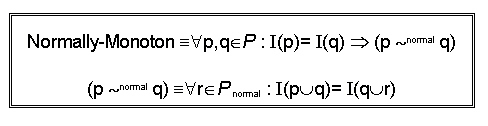
Un PIE con questa proprietà è detto MONOTONO:
  • si può vedere l'effetto;
  • Si ha lo stato.

  • Questa proprietà è molto restrittiva (modelessness)
  • Possiamo distinguere i comandi normali dai meta-comandi
  • Presentiamo una variante della monotonicità

    In un sistema normally-monotone gli stati che sembrano uguali sono uguali

    Completeness

  • Si possono ottenere tutti gli effetti


    Reachability

  • Lo sopo è raggiungere qualche stato da qualche altro stato (spesso dopo ERROR).

    Se il modello PIE ` completo possiamo riscrivere:

  • Qualunque cosa l'utente faceva (p) lo possiamo correggere con (r) per ottenere l'intenzionale (q) : possiamo ottenere dovunque da dovunque!
    ex:In alcuni word processor i documenti di dimensioni 0 non possono essere prodotti dopo che è stato sottoposto un comando: stato unreachable.
  • Complexity or Reachability ??
  • Il reachability permette di ottenere un effetto ricercato: se vogliamo un stato allora abbiamo bisogno di uno stato (mega-reachability).

  • Qualsiasi stato si è raggiunto esisterà un r tale che qualsiasi effetto prodotto dall'utente è lo stesso come se il sistema fosse in qualche stato ( class equiv. contenenti q)
  • Reachable: ottenere un dato effetto.
  • Mega-Reachable: ottenere uno stato dato e si determina il comportamento futuro
  • Un modello PIE monotono reachable è anche megareachable finché ` modeless e l'interpretazione dei comandi futuri è univoca.
  • Un sistema banner non è reachable, così come i sistemi che hanno un'idea del tempo.
    Alcuni dettagli devono essere ignorati per ottenere sistemi reachable.

    Le proprietà di UNDO

  • Se il sistema è reachable gli errori non possono essere recuperabili.
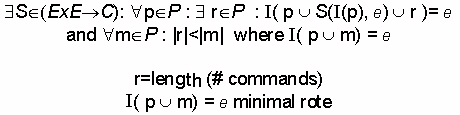
  • Come possiamo trovare la sequenza di comandi r ?
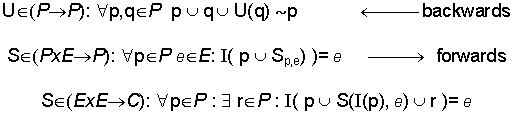
  • U è la funzione UNDO che mi dice come posso ritornare da un errore commesso in q...


  • Assumiamo un sistema modeless, con un generico p...
  • Infatti U(q) può essere diverso da U(p)...
    ex:U(LEFT)=RIGHT U(UP)=DOWM
  • Sarebbe bello che se esistesse una proprietà composizionale fosse:

  • Se fosse possibile fare l'UNDO per una sequenza di comandi, dovrebbe essere possibile effettuare l'UNDO per ciascuno comando separatamente.
  • Il sistema dovrebbe conoscere U(x)
  • Etichettare l'UNDO Undo:
  • Fare un Undo di un Undo non itself (UNDO/REDO) nessuna propr. di composizione (solamente l'ultimo comando può essere undoabile): FLIP UNDO;
  • È impossibile riparare ad un undo Does not undo erroneamente fatto

  • Un sistema che presenti un FLIP UNDO è ambiguo (e non monotono).
  • L'utente npn può dire cosa accadrà dopo un UNDO.

  • I comandi che producono effetti uguali in un PIE monotono sono equivalenti
  • If r=UNDO

    entrambe sono contraddittorie!!!!
  • UNDO non può operare in monotonicità
  • Imponendo una "short strategy":

  • Proviamo a computare S(c1,c2) senza una piena conoscenza di c1,c2 (LAZY EVALUTATION)
    i.e.: proviamo ad ottenere un o/p da S il più presto possibile.

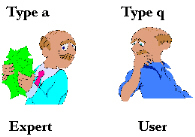
    Colli di bottiglia per l'utente e l'interfaccia

  • L'utente può vedere solamente l'informazioni presenti sullo schermo
  • L'utente vuole raggiungere una meta indipendentemente dallo stato/modo del sistema
  • Non c'è una semplice realazione tra ciò che si vede ed i risultati ottenuti
    Redictability

  • To achieve a goal we need a special class of funcyion called strategies.
  • A system has an UNDO strategy if there is a way to determine U(q) for the wrong q

  • From the current effect to the wanted one.
    Honesty

    If effect is changed then it may be seen on the display


  • If two display look the same, the system is in equivalent state
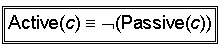
  • Passive commands permits observation but do not change the risult; it may change system state, effects of subsequent commands on the result are unaffected.

  • Active commands:

  • We need a passive strategy to allow the user to Observe enough of the E-space (Effects) to be able to predict the effects of future commands
  • The user coul get a full principal printout on paper; the user may develop a mental model of the result: the current effect may be det. from the display and his mode.
    Windows Manager

  • Windows Manager allows attachment of I/O device to each single windows once a window is selected it will be in the foreground all its features will come to life and, conversely, all the other windows will spleep
  • There is a principal window PIEwm
    There are a lot of windows PIEi i=1..n where n=# windows having a common set of commands
  • The effect space is Ewm=E1xE2xE3x....xEn which may be rewritten as: Ewm=En
  • Iwm is composed of:
  • I':interprets select(i)
  • I'':interprets all other commands
  • The result of I' will enable I'' to determine which window + the corresponding programs will execute
    I':P->(NxPn) I'(p)= i* (p1,p2,...,pn)
    providing the chosen windows (i) and the programs directed to each window(1...n).
    Suppose window i was chosen:

  • Now we define the behaviour of SELECT

    The default for initail case is windows number=1
    I'(0)=1x(0,0,...,0)
  • Now I'' applies Ii to their respective programs:
    I'':Pn->(Ewm)
    I''( < p1, p2,...,pn > )=< I1(p1),I2(p2),...,In(pn) >
    for each p :Iwm(p)=I''prog(I'(p)) more coincisely Iwm=I'' prog I'
  • PIEwm is not monotone even if PIE1...PIEn are suppose n=2, we have two pies for corresponding windows
    Iwm(1)=Iwm(2)= < 0,0,...,0 >
    Iwm(1c)= < c,0,0,...,0 > or Iwm(2c)= < 0,c,0,...,0 >
    The interp. of window selection is the same but the interp. after c differs.
    A PIE is monotone if I(p)=I(q) implies p equivalent q
  • Here Iwm(1)=Iwm(2) but 1 is not equivalent 2 : in fact PIEwm is not monotone then Ewm:NxEn
    Interpretation

  • Interaction may be driven by active commands, by modifying the cript (UNDO,SKIP,REDO, etc..) or by modifying interpretation.
  • The system will be modey, some states may never be reached.
  • A scope must be defined, afixed # alternative features(AFs).
  • We may change I for each different window/program/process (n interpretation for n windows).
  • One may also have range of values (Key repeat rate, mouse displace speed, etc...)
    Modifying Interpretation by programming:

    Difficult to be done at design, simplem. time:
  • Iterative design
  • Provide programming features
  • No modif. possible- esay to use system
  • Modifying Interpretation by adaptation:

  • The system 'learns' from the user, it starts being very simple and gradually becomes more sophisticated (like video games), the user also adapts... does the full system converge to stability ?
  • Multiparadigmatic approach in VQS
  • Large DBs do not make a user activity pattern evident; Small DBs allow the user to pick and choose without a pattern
  • The analysis of user errors is not trivial
  • Menu choices: if frequent could be automated made easier, nearer, etc...
  • Finally adapt. of the syst. could also be unnotreable to user

  • [Precedente] [Home Page] [Successivo]